Publish
BuyBlurb gives you multiple ways to publish saved blurbs on your storefront. While this page focuses on product templates, blurbs are stored as Shopify metafields and can be rendered anywhere your theme supports Liquid—such as collections, product cards, or custom layouts.
Have a question, need help, or want advice on getting the best results?
We’re happy to help. Send a message to [email protected].
Theme block
The BuyBlurb Theme Block controls how saved blurbs appear on your storefront. It is compatible with Online Store 2.0 themes and does not require custom Liquid code.
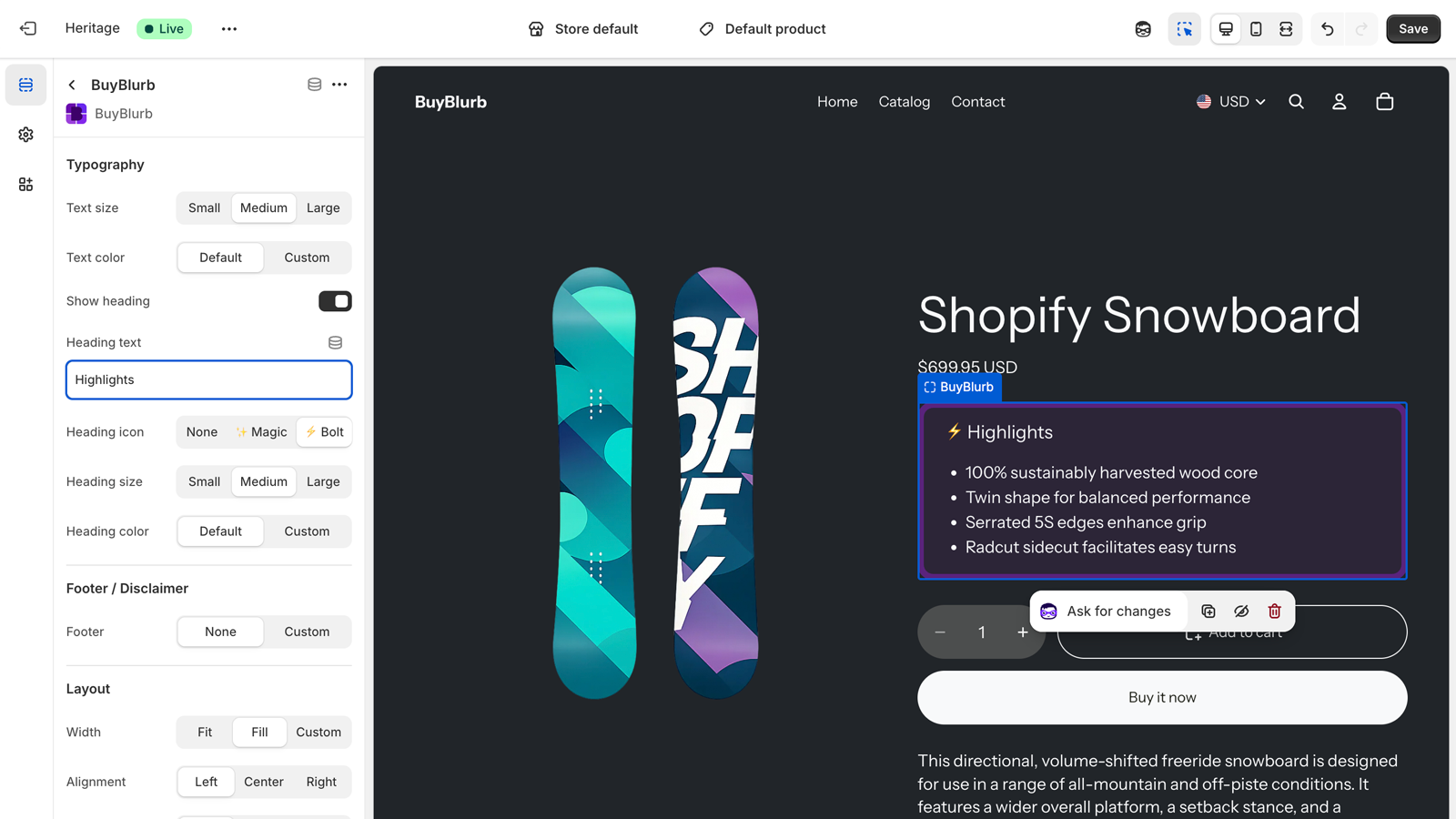
To add the Theme Block:
- Open Online Store → Themes → Edit theme (formerly Customize)
- Navigate to a product template
- Add the BuyBlurb block where you want it to appear
The block renders content directly from product metafields, ensuring fast, reliable delivery without additional scripts.
Because blurbs are stored as Shopify metafields, your generated content remains available if you downgrade or pause your plan.
If you uninstall BuyBlurb, the included theme block will no longer render— but the metafield content itself is untouched and can be used in any theme or custom snippet.
The BuyBlurb Theme Block is designed to be simple to use but deeply configurable. It follows Shopify’s best practices for performance, accessibility, and SEO, and gives you full control over layout, styling, and visibility—without requiring custom code.
For vintage or non–Online Store 2.0 themes, blurbs can also be rendered using a lightweight snippet that outputs the same metafield content directly in your theme.
Using BuyBlurb outside product pages
While the BuyBlurb Theme Block is intentionally limited to product templates, blurbs themselves are stored as Shopify product metafields. This means they can also be rendered manually in other contexts—such as collection pages, product cards, or custom layouts—using a Liquid snippet.
In most cases, you can use the same snippets shown below (Legacy themes)—including the Basic and Advanced legacy snippets—to render BuyBlurb content in collections or product card templates. No special “collection-only” snippet is required.
Advanced usage: Rendering BuyBlurb content outside product templates requires manual placement using a snippet and is best suited for developers or advanced theme customizations.
This approach gives you full flexibility over where and how blurbs appear, but it also comes with a few important considerations.
Performance considerations
When a snippet is used inside a collection loop or product card layout, it may be evaluated once per product on the page. On large collections, this can increase Liquid rendering work.
For best performance, keep snippet output minimal, avoid additional logic inside loops, and prefer the Theme Block for primary product pages whenever possible.
Theme-specific product variables
Not all themes expose the product object using the standard product
variable—especially in collection templates or card snippets. Some themes use
alternate variables such as card_product, item.product,
or pass the product object as a snippet parameter.
If your theme uses a non-standard product variable, you may need to update the snippet to reference the correct object before accessing BuyBlurb metafields.
For example, if your theme exposes a product as card_product, you can
replace references to product in the snippet with
card_product before pasting it into your collection or card template.
Tip: If a blurb doesn’t render outside a product page, inspect the surrounding template to confirm which product variable is available in that context.
Legacy themes
BuyBlurb can be used with older or custom Shopify themes that do not support Online Store 2.0 app blocks. In these cases, blurbs are rendered directly from product metafields using a lightweight Liquid snippet.
This approach requires no JavaScript, does not affect storefront performance, and works reliably across vintage themes and heavily customized layouts.
Two snippet options are available:
- Basic snippet — a minimal, drop-in option that outputs the blurb with automatic paragraph or bullet list detection.
- Advanced snippet — a full-featured option with optional heading, footer disclaimer, and theme-safe styling controls.
Both snippets read from the same BuyBlurb metafields and automatically skip draft or inactive blurbs.
Basic legacy snippet
Use this snippet if you want the simplest possible integration with minimal markup and styling. It is ideal for themes where you want BuyBlurb output to inherit existing typography and layout styles.
{% comment %}
  BuyBlurb – Basic Legacy Theme Snippet
  Paste into product.liquid or main-product.liquid
{% endcomment %}

{% if product.metafields.buyblurb.summary %}
  <div class="buyblurb">
    {% assign blurb = product.metafields.buyblurb.summary.value %}

    {% if blurb contains '- ' %}
      {% assign blurb_lines = blurb | split: '- ' %}
      <ul class="buyblurb__list">
        {% for line in blurb_lines %}
          {% if line != blank %}
            <li class="buyblurb__item">{{ line | strip }}</li>
          {% endif %}
        {% endfor %}
      </ul>
    {% else %}
      <p class="buyblurb__summary">{{ blurb }}</p>
    {% endif %}
  </div>
{% endif %}
Advanced legacy snippet
This version provides full control over presentation, including optional headings, disclaimers, background styling, borders, and spacing. It closely mirrors the flexibility of the BuyBlurb Theme Block while remaining fully compatible with legacy themes.
{% comment %}
  BuyBlurb – Advanced Legacy Theme Snippet
  Paste into product.liquid or main-product.liquid
{% endcomment %}

{% assign blurb_status = product.metafields.buyblurb.status %}
{% assign blurb_text = product.metafields.buyblurb.summary | strip %}

{% if blurb_status == "active" and blurb_text != blank %}

  {% comment %} Configuration {% endcomment %}
  {% assign show_heading = true %}
  {% assign heading_text = "Summary" %}
  {% assign heading_icon = "✨" %}

  {% assign text_size = "1rem" %}
  {% assign text_align = "left" %}

  {% assign background_color = "#ffffff" %}
  {% assign background_opacity = 1 %}
  {% assign border_color = "#e5e7eb" %}
  {% assign border_width = "1px" %}
  {% assign border_radius = "6px" %}

  {% assign show_footer = true %}
  {% assign footer_text = "Generated by AI, reviewed by a human." %}

  {% comment %} Detect list vs paragraph {% endcomment %}
  {% assign is_list = false %}
  {% if blurb_text contains '- ' %}
    {% assign is_list = true %}
  {% endif %}

  <section
    class="buyblurb-legacy"
    style="
      font-size: {{ text_size }};
      text-align: {{ text_align }};
      background: rgba({{ background_color | color_to_rgb | remove: 'rgb(' | remove: ')' }}, {{ background_opacity }});
      border: {{ border_width }} solid {{ border_color }};
      border-radius: {{ border_radius }};
      padding: 1rem;
      margin: 1rem 0;
    "
  >

    {% if show_heading %}
      <h3 style="margin-top:0;">
        {% if heading_icon != blank %}
          <span aria-hidden="true">{{ heading_icon }}</span>
        {% endif %}
        {{ heading_text }}
      </h3>
    {% endif %}

    {% if is_list %}
      <ul style="padding-left: 1.2rem; margin: 0;">
        {% assign lines = blurb_text | split: '- ' %}
        {% for line in lines %}
          {% assign item = line | strip %}
          {% if item != blank %}
            <li>{{ item | escape }}</li>
          {% endif %}
        {% endfor %}
      </ul>
    {% else %}
      <p style="margin:0;">{{ blurb_text | escape }}</p>
    {% endif %}

    {% if show_footer and footer_text != blank %}
      <div
        class="buyblurb-footer"
        style="
          margin-top: 0.75rem;
          padding-top: 0.5rem;
          font-size: 0.85em;
          opacity: 0.75;
          border-top: 1px solid {{ border_color }};
        "
      >
        {{ footer_text | escape }}
      </div>
    {% endif %}

  </section>

{% endif %}
This snippet provides a full-featured BuyBlurb output for older or custom Shopify themes that do not support Online Store 2.0 app blocks.
Who this is for: Use this only if your theme does not support app blocks or you need full manual control over layout, styling, and placement.
Where to paste
-
Open your theme’s product template (commonly
product.liquid,main-product.liquid, orproduct-template.liquid) - Paste the snippet where you want the BuyBlurb to appear — typically near the product description or price
What this snippet does
- Reads the BuyBlurb metafield from the product
- Automatically detects paragraph vs bullet list output
- Optionally shows a heading and footer disclaimer
- Applies safe, theme-friendly default styling
Safe to customize
- Heading text and icon
- Font size and alignment
- Background color, borders, and padding
- Footer disclaimer text
Do not remove: The metafield checks, status check, or list detection logic. These prevent draft or invalid blurbs from rendering.